之前写了一篇文章简单介绍了 firewall-cmd 怎么使用,详情可以查看
如果对于web应用,需要封禁的ip比较多,使用 ipset 几乎是唯一的选择。
ipset 是什么?
ipset 是linux内核种用于管理ip地址集合的框架。简单的说,就是可以定义一个或者多个ip集合,可以动态的添加或者删除里面的ip地址,并且查询效率非常高。这是说的查询非常高,意思是可以快速的判断一个ip地址是否在定义的集合种。
为什么不在 nginx 种进行ip的封禁
主要有两个原因: 第一:需要频繁的修改配置文件。 第二:效率不高。这里说的效率不高,主要是源地址建立tcp后才能nginx处理,使用 firewall-cmd 则不需要。另外就是查询的效率。
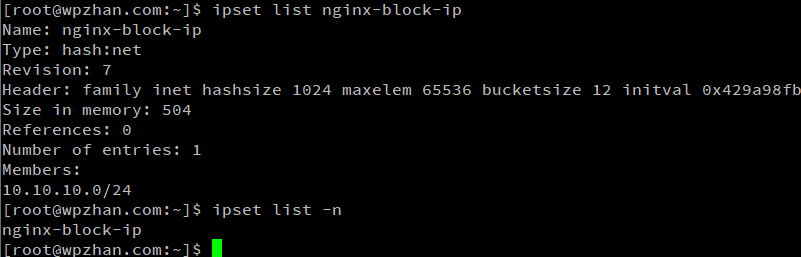
ipset 怎么使用
# 创建ip集合 (参数可以加上 timeout 3600; hash:ip; hash:ip,port)
# hash:net 可以支持单个ip也支持网段集合
ipset create nginx-block-ip hash:net

# 添加ip或者ip网段 (支持参数 timeout 600)
ipset add nginx-block-ip 10.10.10.0/24

# 删除
ipset del nginx-block-ip 10.10.10.0/24
ipset flush nginx-block-ip # 清空
ipset destroy [nginx-block-ip] # 删除所有

# 查看
ipset list -n
ipset list nginx-block-ip
ipset test nginx-block-ip 10.10.10.10
firewalld不会自动识别使用ipset create命令手动创建的集合。这是因为firewalld有自己的一套管理机制,它只认自己“亲手”创建的集合。
结合 firewall-cmd 使用
# 使用 firewall-cmd 创建ipset
firewall-cmd --permanent --new-ipset=nginx-block-ip --type=hash:net
firewall-cmd --permanent --ipset=nginx-block-ip --add-entry=xxx.xxx.xxx.0/24
firewall-cmd --ipset=nginx-block-ip --add-entry=10.10.10.0/24
# 查看
firewall-cmd --ipset=nginx-block-ip --get-entries
firewall-cmd --permanent --ipset=nginx-block-ip --get-entries

# 删除
firewall-cmd --ipset=nginx-block-ip --remove-entry=10.10.10.0/24
firewall-cmd --permanent  --ipset=nginx-block-ip --remove-entry=xxx.xxx.xxx.0/24

#使用区域(Zone)重定向
firewall-cmd --permanent --zone=drop --add-source=ipset:nginx-block-ip
# 查看
firewall-cmd --permanent --zone=drop --list-all

#使用富规则(Zone)重定向
firewall-cmd --permanent --add-rich-rule='rule family="ipv4" source ipset="nginx-block-ip" drop'

firewall-cmd --reload